

How Do I Start Learning Kubernetes?
In today’s world, orchestrating and managing Docker containers with Kubernetes is a big deal. More and more workloads are moving to containerized environments, especially at software companies that are just starting out.
At CloudTruth, we’re heavily focused on making Kubernetes secrets and configuration data easier for all organizations, but before you can understand how to use CloudTruth with Kubernetes, you have to learn Kubernetes itself.
What Is Kubernetes?
When you drive a car, you need several pieces, but let’s think about the engine and the wheels. Without wheels, a car still starts. It can run, you can rev the engine, change the oil, and it all works, but you can’t actually move. Once you put the wheels on, the car can go from place to place.
In a nutshell, that’s what Kubernetes does.
Without an orchestration system like Kubernetes, a Docker container can run just fine. You can deploy applications via a single Docker container, but once that container goes down, that’s it. There’s no scalability to the container, no failover, no self-healing. The container is pretty much on its own and by definition, containers are meant to be ephemeral. That means a container realistically isn’t supposed to run on its own as a virtual machine can.
Kubernetes allows you to take that container and scale it out across systems and regions, along with giving an application the ability to self-heal. With a Kubernetes deployment, instead of having only one container running an application, you can have as many Kubernetes Pods as you want running.
The first thing you’ll want to think about is the prerequisites prior to learning Docker and Kubernetes. By default, you should have an understanding of systems (like virtual machines), architecture, and requirements needed for an application to run. You don’t have to be an expert architect, but you should know how systems work. A good background to have is something in Systems Administration, application development, or both.
After you acquire systems and application knowledge, the best way to learn Docker and Kubernetes is by getting hands-on. Like anything else in the tech space, learning the theory around Docker and Kubernetes is great, but it’s how you apply that theory. You can find a great Kubernetes Getting Started tutorial.
How Long Will It Take To Learning Kubernetes?
In terms of how long it’ll take to learn Kubernetes, it all depends on your previous experience, but most courses are between 3 and 5 hours long. If you add in lab time, reading, and exploring different ways to utilize Kubernetes, around 20 hours is a good enough timeframe to expect you’ll be able to start working with Kubernetes in a work environment.
Kubernetes Architecture
Depending on what Kubernetes environment you go with, whether it’s on-prem or in the cloud, the internal architecture is always the same.
You have two types of nodes:
Master nodes
Worker nodes
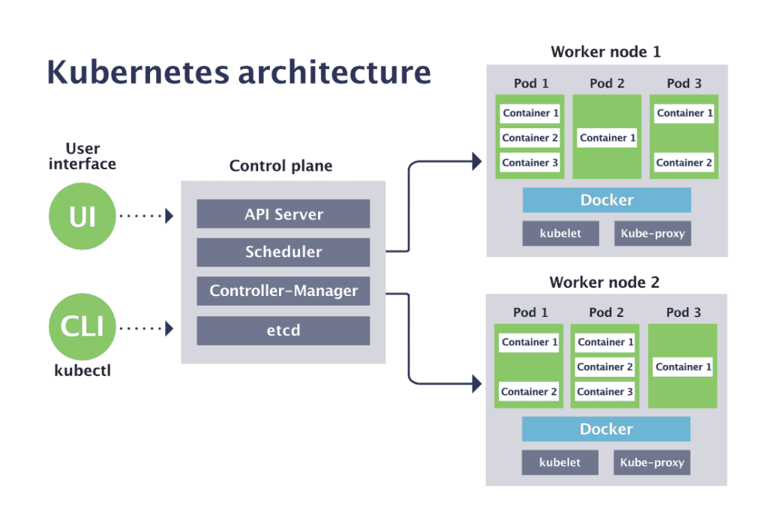
Figure 1: Kubernetes architecture
Master Nodes
Master nodes, usually referred to as the control plane, are where the core of Kubernetes lives. Think about it as the brain/mastermind behind the entire stack. It has four key components:
API server: All deployments, services, and pretty much anything that you do against Kubernetes is all done programmatically. The way that you’re able to perform actions against Kubernetes programmatically is via the API. The API server exposes a REST interface to the Kubernetes cluster.
Scheduler: The scheduler assigns work to nodes. For example, let’s say you have a 3-node cluster and one of the nodes is reaching a capacity limit. The Scheduler will see that and point workloads to another node.
Controller: Responsible for the state of the cluster.
etcd: key/value pair that shares the current state of the cluster. It’s sort of like a configuration store or a database of sorts. Nodes can also refer to etcd to see what configuration they should have per the rest of the cluster.
Worker Nodes
Worker nodes are the servers that do all of the heavy lifting. It contains all of the containers, pods, deployments, and everything else that’s running the applications. Think about it like VMs that are running a standard application, except the worker nodes are running multiple applications depending on how many Kubernetes deployments and pods are running.
Kubernetes Cloud Services
There are a few ways that you can run Kubernetes, including:
On-prem with a raw Kubernetes cluster
In the cloud with a raw Kubernetes cluster
In a Kubernetes cloud service
Kubernetes cloud services, like Elastic Kubernetes Service (EKS) in AWS or Azure Kubernetes Service (AKS) are typically what people go with today. The reason why is because it’s the least amount of setup and overhead. With a Kubernetes service in the cloud, you don’t have to worry about managing a master node, the API, or etcd. Instead, you just have to worry about managing the worker nodes.
With some services, like Google Kubernetes Engine (GKE) autopilot and AWS EKS with Fargate, it’s serverless, so you don’t even have to worry about the worker nodes. Instead, all you have to worry about is the application itself. When you get to this stage in your journey to learn Kubernetes CloudTruth is a great way to manage your configuration settings (ConfigMaps) and secrets.
Kubernetes Tutorial
Now that you know about Kubernetes, what prerequisites you need for Kubernetes, and how to learn Kubernetes, it’s time to go through a quick tutorial! You’ll learn how to install Kubernetes on your local machine using Minikube.
What Is Minikube?
When you’re first getting started with Kubernetes, instead of spinning up a new cluster, you can run Kubernetes locally with Minikube. Minikube is a local development Kubernetes cluster that you can use to test new workloads or learn Kubernetes.
Because of its nature (running locally on your machine) It’s not meant to be used in production. However, it’s great for learning Kubernetes.
Getting Started With Minikube
First, you’ll need to install Minikube for your operating system. You can find the installation instructions here.
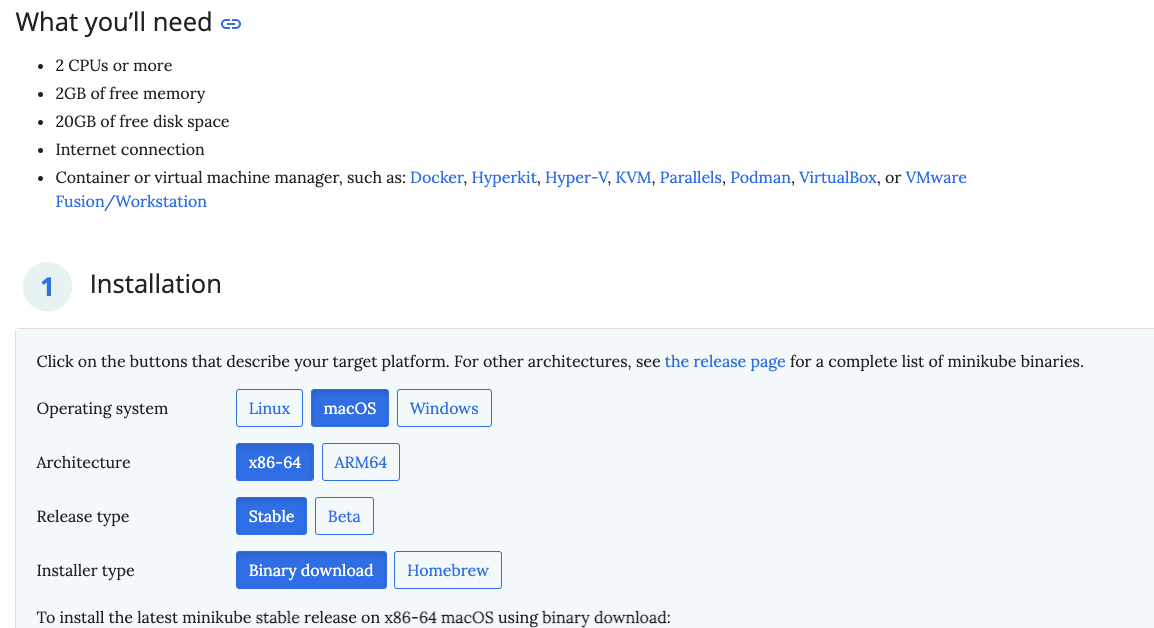
Figure 2: Get started with Minikube
Once you have Minikube installed, open up a new terminal and run: minikube start
You’ll see an output similar to the screenshot below.
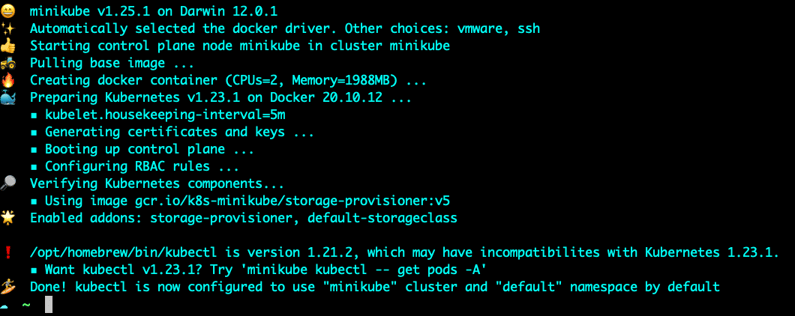
Figure 3: minikube install
To confirm that Minikube is up and running, run the following command to see that your local computer is the Kubernetes cluster.
kubectl get nodes

Get nodes command
Cleanup
To remove the Minikube cluster from your local machine, run the following command:
minikube delete
Learn more about how CloudTruth helps manage your Kubernetes ConfigMaps and Secrets for multiple environments.
